mBot Neo – Beginner Coding Robot – Makeblock opens the door to a world where coding becomes an accessible adventure for everyone. This innovative robot is designed not just for kids but for anyone curious about programming, offering a hands-on approach to learning. With its user-friendly interface and engaging design, mBot Neo makes it easy to dive into the exciting realm of coding.
Equipped with various sensors and components, mBot Neo provides a platform that fosters creativity and critical thinking. Its compatibility with multiple programming environments allows users to explore coding through practical applications, making the learning experience both enjoyable and effective.
Introduction to mBot Neo: MBot Neo – Beginner Coding Robot – Makeblock
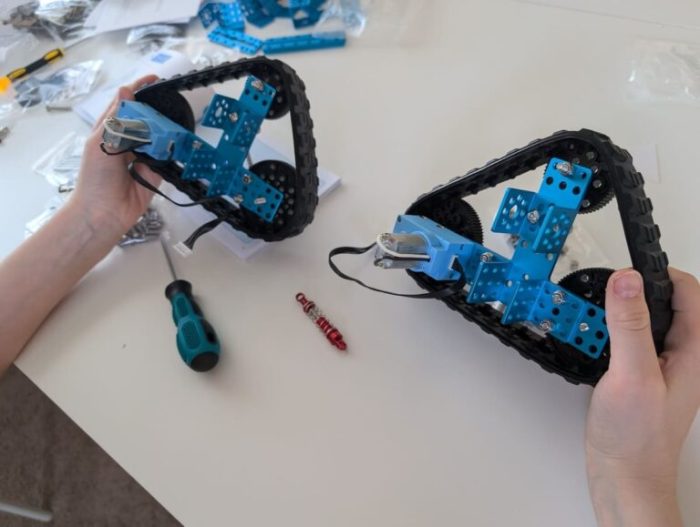
The mBot Neo is designed as an entry-level coding robot that combines fun and education, making it an ideal tool for beginners. Its sleek and modern design features customizable elements, allowing users to personalize their robot while learning. The targeted audience for the mBot Neo includes children aged 8 and above, educators seeking innovative teaching methods, and hobbyists interested in exploring the basics of robotics and coding. The primary purpose of the mBot Neo is to facilitate learning coding concepts through hands-on experience, promoting problem-solving skills and logical thinking in an engaging environment.
Key Features of mBot Neo
The mBot Neo is equipped with several notable technical specifications that enhance its functionality and user experience. These specifications include:
- Microcontroller: Arduino-compatible board
- Communication: Bluetooth and USB connectivity
- Power Supply: Rechargeable lithium battery
- Motor: Dual motor drive for precise movement
The mBot Neo supports various programming environments including mBlock, Scratch, and Arduino IDE, making it versatile for users with different programming backgrounds. It features a variety of sensors and components, such as infrared sensors, light sensors, and ultrasonic sensors, allowing users to explore a wide range of robotics applications.
Getting Started with mBot Neo
To start using the mBot Neo, users can follow a straightforward installation guide:
- Unbox the mBot Neo and ensure all components are included.
- Assemble the robot by following the provided instructions.
- Charge the battery until fully powered.
- Establish a Bluetooth connection or use a USB cable to connect to a computer.
Users need to download the mBlock software, which is available on the official Makeblock website. Installing it is simple and requires a few clicks. Common setup issues can arise, such as connectivity problems or software errors. A troubleshooting guide is essential to address these concerns, ensuring a smooth start to programming.
Programming the mBot Neo, MBot Neo – Beginner Coding Robot – Makeblock
The mBot Neo can be programmed using various languages, including Scratch, Python, and Arduino. Beginners often start with block coding, which allows them to create simple programs visually. For example, users can create a program that makes the robot move forward and turn using basic commands. This hands-on approach enables users to grasp fundamental programming concepts effectively.
Learning Activities and Projects
Several beginner coding projects are suitable for the mBot Neo, offering practical applications of coding skills. These projects may include:
- Obstacle avoidance robot
- Line follower robot
- Interactive dance performance
Interactive activities that enhance understanding of programming concepts can involve challenges where students modify existing programs to achieve specific tasks. A project timeline can be established to guide students through a coding challenge, ensuring they have a structured approach to learning.
Community and Support
A wealth of online resources and communities exists for mBot Neo users, including forums, social media groups, and educational websites. These platforms offer a space for users to share experiences, ask questions, and access shared resources. Comprehensive documentation and tutorials are available to support further learning, assisting users in overcoming programming hurdles. Testimonials from educators and students highlight the positive impact of mBot Neo in enhancing coding education and engagement.
Advantages of Using mBot Neo in Education
When compared to other coding robots in the market, the mBot Neo stands out due to its affordability, ease of use, and extensive support resources. The benefits of hands-on learning through robotics are significant, as students can apply theoretical knowledge in practical situations. The use of mBot Neo has been shown to increase student engagement in coding, fostering a passion for technology and innovation.
Advanced Features and Capabilities
For advanced users, the mBot Neo supports several advanced programming techniques, including using sensors for data collection and implementing algorithms for complex tasks. Potential upgrades or expansions, such as additional sensors or modules, can enhance the robot’s capabilities. Users can also integrate mBot Neo with other technologies, such as IoT devices, to explore more sophisticated robotics projects.
Future of Learning with mBot Neo
The future trends in educational robotics and coding indicate a growing emphasis on interactive and experiential learning. As technology evolves, the mBot Neo is likely to undergo enhancements, incorporating more features and tools that align with modern educational needs. Coding robots like mBot Neo will continue to shape future learning environments, preparing students for a technology-driven world by cultivating essential skills in coding and problem-solving.